What is a Hot Spot?
You have made the switch to clean energy and installed a rooftop solar PV system. Sunlight falls on your panels, electricity is generated, and your electricity bills are finally not burning a hole in your pocket. Yet not everything may be working as well as it appears. Over time, a single cell or group of cells within one panel may begin to overheat, its temperature climbing well above that of the surrounding cells without any visible warning. That is a hot spot, and if left unattended, it can silently eat away at your investment.
A solar panel is made up of a number of tiny units called solar cells, all connected together like links in a chain. When one of these cells stops working due to shade, dirt, a crack, or a faulty component, electricity cannot flow through it normally. Instead of generating power, that cell starts absorbing power from its neighbouring cells and converting it into heat.
The effect is similar to a kink in a water hose. The water (electricity) cannot pass through, pressure (heat) builds up at the blocked point, and over time the hose (cell) sustains damage that is difficult or impossible to reverse.
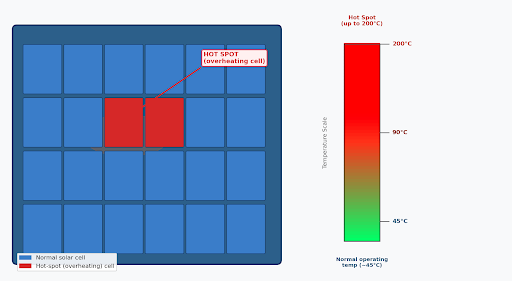
Figure 1: A hot spot occurs when one or more cells overheat (shown in red), reaching temperatures far above the rest | CAG
Why Should You Care?
Hot spots are not just an efficiency issue, they are a safety and financial risk. Hot spots can cause the following:
• Power loss: Even a single overheating cell can cut a panel's output by 25–85%, depending on severity.
• Panel damage: Prolonged high temperatures cause the panel's backsheet (the protective plastic layer) to discolour, blister, or crack.
• Fire risk: In extreme cases, hot spots can ignite the panel's materials or nearby roofing, especially on wooden or thatched roofs.
• Shortened life: A good solar panel should last 25 years. Hot spots can cut that lifespan significantly, costing you tens of thousands of rupees in early replacements.
• Warranty complications: Damage caused by neglected hot spots may not be covered under the manufacturer's warranty.
Researchers and field reports consistently identify hot spots as one of the leading causes of failure in solar PV modules worldwide. Even a shading ratio as small as 4% from a bird dropping or a small leaf is enough to create a hot spot exceeding 90°C. Regular inspection can catch most of these early.
What Causes Hot Spots?
Hot spots arise from five main situations. Any one of them can start the chain reaction of cell overheating.
A single dry leaf, a bird dropping, or the shadow of an overhead water tank on just one cell is enough to trigger a hot spot. This is the number one cause for hot spots. Because solar cells are connected in series (like the links of a chain), one blocked cell forces the others to push current through it, heating it up rapidly.
Micro-cracks can develop during installation (if panels are stepped on or mishandled), during transportation, or due to falling debris. These invisible fractures disrupt the flow of electricity through a cell, creating a localised hotspot at the crack point.
Every solar panel has small safety devices inside called bypass diodes. Their job is to act as an escape route for electricity when a cell is shaded or faulty, preventing overheating. If a bypass diode itself fails, this safety valve disappears and the affected group of cells heats up uncontrolled.
4. Poor Wiring and Loose Connections
Connections between panels and to the inverter that are loose, poorly crimped, or corroded add electrical resistance. Resistance generates heat sometimes concentrated enough to cause a hot spot even at the wiring junction.
In cheaper panels, cells from different batches with slightly different electrical characteristics may be mixed together. This mismatch causes some cells to work harder than others, leading to localised overheating over time.
How Will You Know if Your Panel Has a Hot Spot?
Hot spots are invisible to the naked eye under normal conditions. However, your system will show signs that something is wrong.
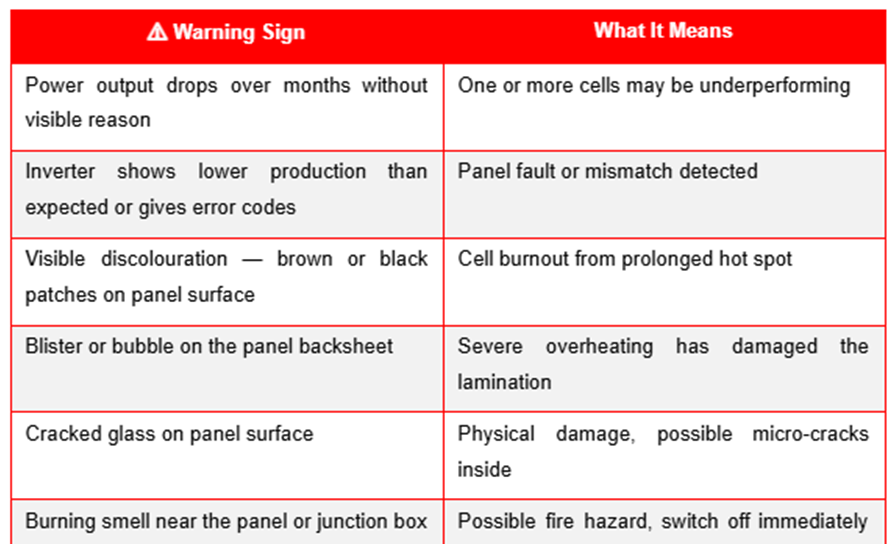
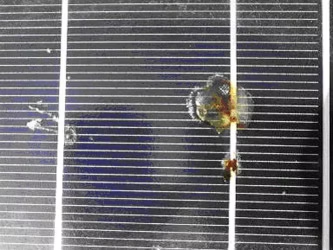
Figure 2: Solar panel with hot spot | RenewSys
If discolouration, burning smell, or blistering is noticed on any panel, switch off the solar system at the AC and DC isolators immediately. Do not attempt to investigate yourself. Instead, call your installer or a certified solar technician.
How to Prevent Hot Spots
The good news is that hot spots are largely preventable with regular care. The figure below shows what can be done to stop it from happening.
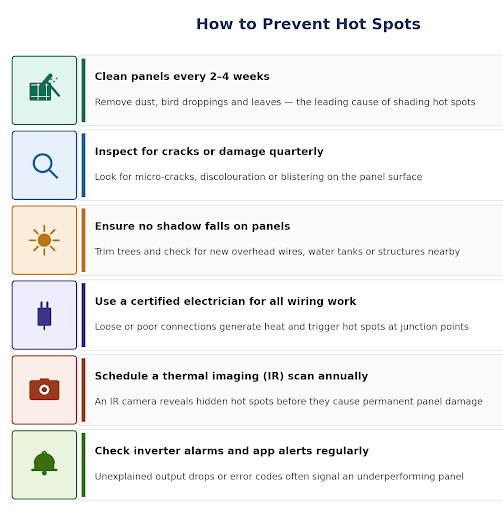
Figure 3: Simple steps every consumer can take to prevent hot spots | CAG
Thermal (Infrared) Inspection
The most reliable way to detect hot spots is with a thermal imaging camera also called an infrared or IR camera. This device creates a heat-map image of your panel, showing hot spots as bright yellow or red patches against the cooler blue-green background of the rest of the panel.
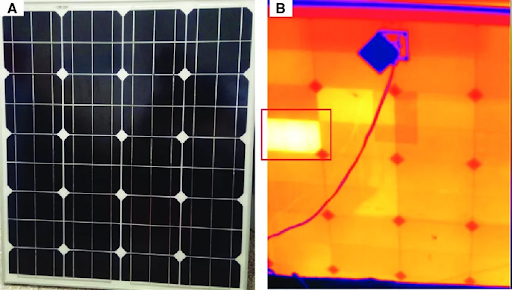
Figure 4: Solar module with hot spot (a) red-green-blue (RGB) image and (b) infrared image from the back with hot spot | Research gate
A solar installer or a certified energy auditor can carry out an IR inspection once a year. This is increasingly being offered as part of Annual Maintenance Contracts (AMCs) for rooftop solar systems in Tamil Nadu.
What to look for in an IR report:
• A temperature difference of more than 10°C between cells in the same panel indicates a problem.
• Bright hot spots confined to a small area suggest a shading or crack issue.
• A whole row of cells overheating usually points to a bypass diode failure.
• Multiple panels showing hot spots may indicate a systemic wiring or installation fault.
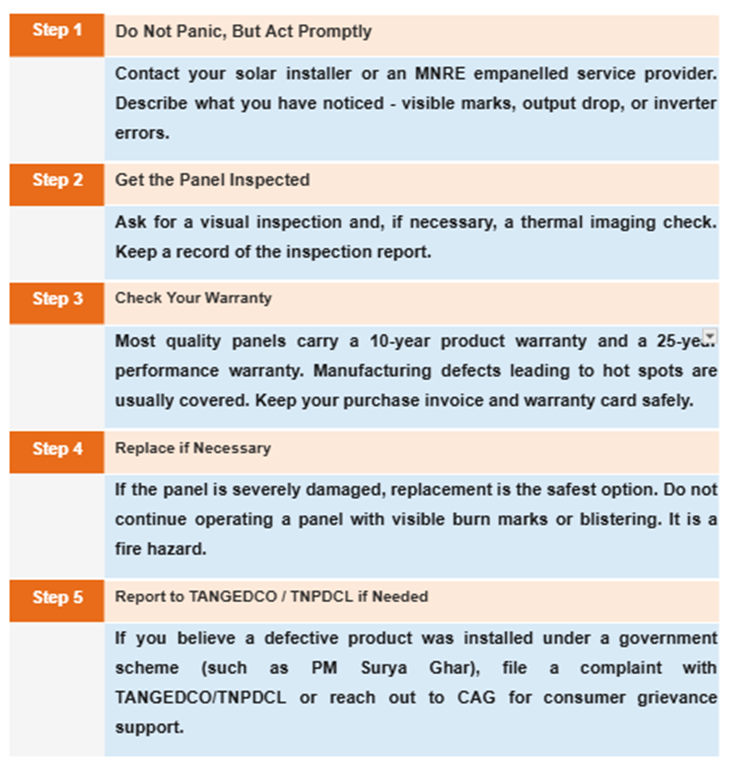
What to Do If Your Panel Has a Hot Spot
A Quick Consumer Checklist
Monthly:
• Clean panels with a soft cloth/mop and plain water (early morning or evening).
• Check your inverter display or app, compare today's output with the same day last month.
• Look for bird droppings, leaves, or shadows from new construction nearby.
Every 3 Months:
• Walk around and visually inspect panels for cracks, discolouration, or blistering.
• Check all wiring connectors and junction boxes for signs of rust, looseness, or burning marks (with the system switched OFF).
Annually:
• Schedule a professional inspection, including thermal imaging if possible.
• Renew your Annual Maintenance Contract (AMC) with a certified installer.
• Update your record of annual energy production to catch long-term degradation trends.
Add new comment